Download Mobile App
Choosing the right productivity tool can feel like navigating a maze, especially with so many options available. Two popular choices that often come up in discussions are Obsidian and Notion. Both of these tools offer unique features and functionalities that cater to different user needs. But how do you decide which one is right for you? In this article, we'll dive deep into the strengths and weaknesses of Obsidian and Notion, helping you make an informed decision based on your specific requirements.
Quick takeaway: choose Obsidian when personal, markdown-first knowledge linking matters most; choose Notion when flexible pages and databases matter most; consider Edworking when the same team also needs tasks, docs, files, chat, meetings, and AI in one workspace.
 Quick decision guide: Obsidian, Notion, or Edworking?
The choice is easier when you separate personal knowledge management from team execution. Obsidian and Notion can both organize information, but they solve different collaboration problems.
- Choose Obsidian if your main priority is local-first notes, markdown files, backlinks, and a personal knowledge graph.
- Choose Notion if your main priority is flexible pages, lightweight databases, and shared team documentation.
- Choose Edworking if your main priority is keeping tasks, docs, files, team chat, video meetings, and AI support in the same workspace.
Decision rule: if the decision is only about notes, compare editor feel and knowledge structure. If the decision affects projects, approvals, meetings, and team handoffs, compare the whole workflow.
Obsidian and Notion
Before we delve into the nitty-gritty of comparing these two tools, it's essential to understand what each one offers. By grasping the fundamental aspects of Obsidian and Notion, you'll be better equipped to see where they shine and where they might fall short.
What is Obsidian?
Obsidian is a powerful note-taking application designed for users who love to organize their thoughts through a network of interlinked notes. Think of it as your digital second brain, where every piece of information is connected to others, making it easier to retrieve and reference later. Obsidian excels in creating a graph view of your notes, which visually represents the relationships between different pieces of content. This can be incredibly useful for writers, researchers, and anyone who deals with complex information webs.
One of the standout features of Obsidian is its markdown-based note-taking. This allows users to write in a clean, distraction-free environment using simple syntax to format their text. Moreover, Obsidian is known for its local-first approach, meaning your notes are stored on your device, providing you with control over your data and ensuring accessibility even without an internet connection. With a plethora of community plugins, users can customize Obsidian to fit their specific workflow needs, from task management to integrating with other tools.
What is Notion?
Notion, on the other hand, is a versatile all-in-one workspace that combines note-taking, project management, and collaboration features. It's like a digital Swiss Army knife for your productivity needs. Notion's strength lies in its flexibility and customizability, allowing users to create databases, kanban boards, calendars, and more, all within a single platform. This makes it an excellent choice for individuals and teams looking to centralize their work in one place.
With Notion, users can create a variety of content types and link them together seamlessly. Its block-based editing system is intuitive, enabling users to drag and drop elements to structure their pages precisely how they want. Notion is also highly collaborative, allowing multiple users to work on the same document simultaneously, making it perfect for team projects and organizational use. Additionally, Notion's integration capabilities mean it can connect with other apps and services, streamlining workflows and improving efficiency.
Now that we have a basic understanding of what Obsidian and Notion offer, let's dive deeper into the specific features and functionalities that set them apart.
Key Features Comparison
To truly understand how Obsidian and Notion stack up against each other, we need to look at their key features. This comparison will highlight the strengths and weaknesses of each tool, helping you see which one aligns better with your workflow and needs.
User Interface
The user interface is the first thing you'll notice when using any productivity tool. It can significantly impact how comfortable and efficient you feel while working.
Obsidian has a minimalist, distraction-free interface that focuses on simplicity and efficiency. The dark mode is particularly popular among users who spend long hours on their screens. The interface is highly customizable, allowing users to change themes and adjust the layout to their liking. However, this minimalism can sometimes feel less intuitive for new users who might prefer more visual guidance.
Notion offers a more visually oriented and modern interface. It uses a block-based system, where each piece of content (text, image, table, etc.) is a block that can be moved around easily. This makes organizing and structuring your content intuitive and flexible. The interface is clean but can appear more cluttered compared to Obsidian due to the vast array of features and options available on each page.
Note-taking Capabilities
Both tools excel at note-taking, but they approach it in different ways.
Obsidian is a markdown-based note-taking tool that emphasizes linking and connecting notes. This approach is excellent for users who need to create a web of interrelated information, such as researchers or writers. The graph view is a standout feature, providing a visual map of how your notes are connected. Additionally, Obsidian supports backlinks and tags, making it easy to find and connect related notes.
Notion, on the other hand, provides a more versatile note-taking environment. Its block-based system allows users to embed various types of content within their notes, such as tables, databases, to-do lists, and even code snippets. This makes Notion incredibly flexible, catering to users who need more than just text-based notes. However, this versatility can sometimes lead to a steeper learning curve for those who just want a straightforward note-taking experience.
Organization and Structuring

How you organize and structure your information can make a big difference in productivity.
Obsidian allows for a highly customizable organization system through folders, tags, and links. Users can create a network of notes that mirror their thought processes, which is particularly useful for knowledge management. The local storage of notes means you can organize them in any way that suits you without worrying about syncing issues.
Notion excels in providing a comprehensive organizational structure. Users can create nested pages and databases, turning Notion into a powerful project management tool. The ability to create kanban boards, calendars, and tables within pages means that you can structure your workspace exactly how you need it. This makes Notion particularly well-suited for users who need to manage multiple types of data and projects simultaneously.
Collaboration Tools
For teams and collaborative work, the ability to work together seamlessly is crucial.
Obsidian primarily focuses on individual use, although it does offer some collaborative features through community plugins. However, its strength lies in its local-first approach and data privacy, making it less optimal for real-time collaboration but excellent for personal knowledge management.
Notion is designed with collaboration in mind. Multiple users can work on the same page simultaneously, making it ideal for team projects. Notion's sharing and permission settings allow you to control who can view or edit specific content, facilitating smooth teamwork. The comment and mention features further enhance collaborative efforts by allowing team members to discuss and review work directly within the platform.
Customization and Flexibility
Both tools offer customization options, but they cater to different needs and preferences.
Obsidian is highly customizable through its extensive collection of community plugins. Users can tailor the app to their specific needs, adding features like task management, calendar integration, and more. This makes Obsidian incredibly flexible, especially for users who enjoy tweaking and personalizing their tools.
Notion provides a different kind of flexibility with its block-based system and template library. Users can create pages and structures that fit their exact requirements, whether it's for personal use or complex project management. Notion's templates are particularly useful for quickly setting up new workflows or projects, providing a head start on organization and productivity.
In summary, both Obsidian and Notion have their unique strengths and cater to different types of users. Obsidian's strength lies in its powerful note-linking capabilities and customization options, while Notion excels in versatility and collaborative features. Understanding these differences can help you choose the tool that best fits your needs.
Performance and Reliability
When choosing a productivity tool, performance and reliability are paramount. You need a tool that responds quickly, works efficiently, and is reliable regardless of your internet connection status. Let’s examine how Obsidian and Notion perform in these critical areas.
Speed and Efficiency
Obsidian is known for its speed and efficiency. Since it operates as a local application with your notes stored directly on your device, it is incredibly fast. There’s no need to wait for cloud syncing or deal with latency issues. This local-first approach ensures that Obsidian is quick to open, navigate, and use, even with a large number of notes. The lightweight nature of the application means it doesn’t hog system resources, allowing for smooth performance even on less powerful devices.

Notion, in contrast, is a web-based application, which means its performance can be affected by your internet connection. While Notion generally runs smoothly, heavy usage with numerous embedded elements like images, videos, and large databases can sometimes slow it down. However, Notion has been steadily improving its performance, and many users find it efficient for everyday tasks. The trade-off for its versatility and rich features is that it might not be as snappy as Obsidian, especially when dealing with extensive content and complex databases.
Offline Access
Obsidian excels in offline access because it stores all data locally on your device. This ensures that you can access, edit, and organize your notes even without an internet connection. This feature is particularly beneficial for users who need to work on the go, in areas with poor connectivity, or simply prefer the security and reliability of local storage. Obsidian sync options (through third-party plugins) can keep your notes updated across multiple devices once you're back online, offering the best of both worlds.
Notion, being a cloud-based tool, traditionally relies on an internet connection to function optimally. However, it does offer some offline capabilities. You can access and edit your pages offline, but these changes will only sync once you’re back online. While this feature is useful, it’s not as robust as Obsidian’s local-first approach. For users who frequently find themselves without reliable internet access, this might be a consideration when choosing between the two.
In summary, Obsidian offers superior speed and offline capabilities due to its local-first design, making it an excellent choice for users needing reliable performance and constant access. Notion, while slightly less speedy and dependent on internet connectivity, compensates with its rich feature set and versatility, which many users find indispensable for their productivity needs.
Integration and Compatibility
Integration with other tools and device compatibility are crucial aspects to consider when choosing a productivity tool. The ability to seamlessly connect with other apps and use the tool across different devices can significantly enhance your workflow and efficiency. Let's explore how Obsidian and Notion perform in these areas.
Integration with Other Tools
Obsidian offers a robust system for integration, primarily through its community plugins. Users can find and install a wide range of plugins that enable integration with other tools and services. For example, there are plugins for syncing with Google Drive, Dropbox, and other cloud storage services, as well as integration with task management tools like Todoist. Additionally, Obsidian supports Markdown export, making it easy to transfer notes to other platforms that support this format. However, some integrations might require a bit of technical setup, which could be a drawback for less tech-savvy users.
Notion is designed with integration in mind, offering built-in connections to numerous third-party apps and services. Users can seamlessly integrate Google Calendar, Slack, Trello, GitHub, and many other tools directly within Notion. These integrations allow for a unified workflow where you can manage tasks, communicate with your team, and track projects without leaving the Notion workspace. The ease of setting up these integrations, often just a few clicks, makes Notion particularly appealing for users who want a streamlined and cohesive digital environment.
Device Compatibility
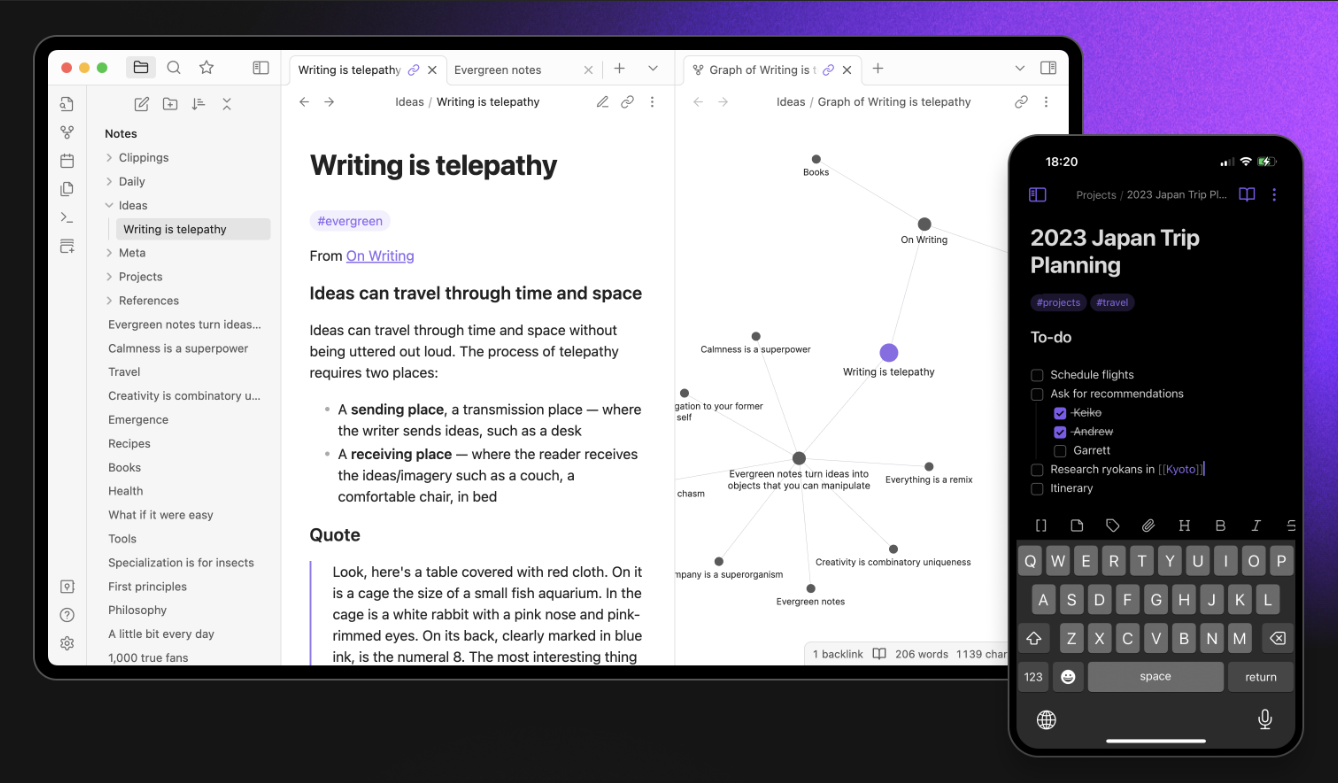
Obsidian is highly compatible across various devices. It offers applications for Windows, macOS, and Linux, ensuring that desktop users can enjoy its full functionality. For mobile users, Obsidian has apps available for iOS and Android, allowing you to access and edit your notes on the go. The local-first nature of Obsidian ensures that your data is always available, regardless of the device you’re using, provided it’s synced properly across platforms. This flexibility makes Obsidian a reliable choice for users who frequently switch between devices.
Notion also excels in device compatibility. It is available on Windows, macOS, and Linux for desktop users, and has dedicated apps for iOS and Android. Being a web-based application, Notion can also be accessed from any device with a web browser, providing exceptional flexibility and convenience. This makes Notion an excellent option for users who need consistent access to their workspace across multiple devices and platforms. The cloud-based nature ensures that your data is always synced and up-to-date, no matter where you log in from.
In summary, both Obsidian and Notion offer strong integration capabilities and device compatibility. Obsidian’s strength lies in its customizable plugin system and robust offline access, making it ideal for users who prefer local data control and extensive customization. Notion stands out with its built-in integrations and seamless web-based access, making it perfect for users who need a cohesive, easy-to-use platform across various devices and services.
Pricing and Value for Money
Understanding the pricing structure and what you get for your money is essential when choosing a productivity tool. Both Obsidian and Notion offer free and paid versions, each with its own set of features and benefits. Let’s dive into the details of their pricing models and evaluate their value for money.
Free vs. Paid Versions
Obsidian offers a highly generous free version that includes most of its core features. Users can create an unlimited number of notes and utilize the powerful linking capabilities and graph view without paying a dime. The free version is sufficient for individual users and those who don’t need advanced collaboration features. However, for those who want to support the developers or need additional functionality, Obsidian offers a Catalyst license. This is a one-time purchase that grants access to insider builds and a few exclusive features. Additionally, Obsidian has a commercial license for business use, ensuring companies comply with licensing requirements.
Notion also provides a free version that is feature-rich and suitable for individual users. The free plan includes unlimited pages and blocks, allowing users to create and organize their content without limitations. It also supports real-time collaboration, which is a significant advantage. However, the free version has a limit on the number of file uploads (maximum 5MB per file), which might be restrictive for some users. To access more advanced features and remove these limitations, users can upgrade to a paid plan.

Subscription Plans
Pricing changes often, so treat plan names and limits as a checkpoint rather than a permanent reason to choose a tool. Compare the total cost of your workflow: note-taking, project tracking, file context, meetings, permissions, AI assistance, and the time your team spends moving work between apps.
- For an individual knowledge base, Obsidian can stay very lightweight.
- For a flexible shared wiki, Notion can work well when projects and communication already live elsewhere.
- For a team operating system, compare whether one workspace can replace separate tools for tasks, docs, chat, files, meetings, and AI.
Use Cases and User Preferences
Different users have varying needs and preferences when it comes to productivity tools. Whether you are a student, a professional, or part of a team, Obsidian and Notion offer unique features that cater to specific use cases. Let’s explore how these tools can fit into different user scenarios.
Ideal for Students
Students often require a tool that can help them take notes efficiently, organize their study materials, and manage their assignments. Both Obsidian and Notion have features that make them suitable for academic use, but they cater to different types of student needs.
Obsidian is perfect for students who prefer a structured and interconnected note-taking system. Its markdown-based editor allows students to focus on their notes without distraction. The graph view helps visualize connections between topics, which is particularly useful for subjects that require understanding relationships between concepts, like history or science. Additionally, Obsidian’s local storage ensures that notes are always accessible, even without an internet connection, which can be crucial during lectures or study sessions in places with limited connectivity.
Notion offers a more versatile workspace for students who need to manage different types of content and assignments. Its ability to create databases, to-do lists, and calendars within the same platform allows students to track their assignments, deadlines, and class schedules effectively. The collaborative features make it easy for students to work on group projects, share notes, and receive feedback from peers. The free version of Notion is often sufficient for most students, providing a cost-effective solution for academic needs.
Best for Professionals
Professionals need a tool that can help them manage their projects, tasks, and client interactions efficiently. The choice between Obsidian and Notion can depend on the nature of their work and their workflow preferences.
Obsidian is ideal for professionals who need a powerful note-taking and knowledge management system. Writers, researchers, and analysts will appreciate the ability to create a personal knowledge base with linked notes and references. The customizable plugins allow professionals to tailor Obsidian to their specific workflow needs, whether it’s integrating task management or syncing with other productivity tools. Its local-first approach ensures data security and privacy, which can be crucial for professionals dealing with sensitive information.
Notion excels as an all-in-one workspace for professionals who need to handle a variety of tasks and projects. Its block-based system and integration capabilities allow users to manage projects, track progress, and collaborate with colleagues all in one place. Professionals in roles such as project management, marketing, and product development will find Notion’s ability to create dashboards, kanban boards, and detailed project plans invaluable. The subscription plans provide additional features like version history and unlimited file uploads, enhancing productivity and collaboration.
Suitable for Teams
For teams, the ability to collaborate seamlessly and manage projects effectively is paramount. Both Obsidian and Notion offer features that support teamwork, but their approaches differ significantly.
Obsidian is less focused on real-time collaboration but can still be useful for teams through its community plugins. Teams that prefer to work independently and then combine their efforts can use Obsidian to create a shared knowledge base. The focus on local storage and privacy makes it suitable for teams that need to keep their data secure and accessible offline. While not traditionally designed for collaborative work, Obsidian can be adapted to team needs with the right setup.
Notion is designed with collaboration at its core. Its real-time editing and sharing capabilities make it an excellent choice for teams. Members can work together on projects, assign tasks, leave comments, and track progress within a shared workspace. The team subscription plans offer advanced features like admin tools and detailed permissions, ensuring that everyone has the access they need to contribute effectively. Notion’s integration with other tools like Slack and Trello further enhances its utility for team-based workflows.
In conclusion, the best choice between Obsidian and Notion depends on the specific needs of the user. Students who prefer a structured and interconnected note-taking system might find Obsidian to be more suitable, while those who need a versatile and collaborative workspace might lean towards Notion. Professionals and teams can benefit from either tool depending on their workflow requirements and the importance of features like local storage, customization, and real-time collaboration.
Edworking: An Alternative Perspective
There is a third angle for teams that are comparing Obsidian and Notion because their work has outgrown scattered notes. If the real problem is keeping decisions, documents, projects, files, conversations, and meetings connected, a note app alone may not be enough.
Edworking is built as an all-in-one workspace for small teams that want project execution and knowledge management together.

Where Edworking fits in the comparison
- Tasks and ownership: turn meeting notes or decisions into assigned work without copying context into a separate project tool.
- Docs and files: keep team knowledge, briefs, attachments, and decisions close to the tasks they support.
- Chat and video meetings: discuss work in the same place where the documents and tasks live.
- AI support: use AI assistance to draft, summarize, and improve team content without sending the workflow to another tab.
Example: a startup planning a product launch can keep the launch brief in Docs, assign feature tasks, discuss blockers in chat, attach launch files, run video check-ins, and use AI to polish customer-facing copy inside one workspace.
For implementation details, compare how Edworking handles team docs and task management inside the same workspace.
For a commercial buying comparison, review Edworking project management software and the Notion alternative comparison before deciding which workflow should become the source of truth.
Conclusion
Final checklist: decide whether you need a personal note graph, a flexible shared wiki, or a connected workspace that also handles projects, files, meetings, and team communication.
If your team is comparing tools because collaboration is becoming fragmented, compare Edworking pricing against the combined cost and switching friction of separate note, project, chat, file, meeting, and AI apps.
When it comes to choosing between Obsidian and Notion, the decision ultimately depends on your specific needs and preferences. Obsidian is ideal for those who need a powerful, markdown-based note-taking system with robust offline capabilities and extensive customization through plugins. It shines in creating a personal knowledge base where notes are interlinked, making it perfect for researchers, writers, and anyone who deals with complex webs of information.
Notion, on the other hand, offers a versatile, all-in-one workspace that excels in flexibility and collaboration. Its block-based system and rich feature set make it suitable for individuals and teams looking to manage a wide range of tasks and projects within a single platform. The built-in integrations and real-time collaboration tools make Notion an excellent choice for teams and professionals needing a unified digital workspace.
For those exploring other options, Edworking presents a compelling alternative with its integrated task management, collaboration tools, and AI-powered writing assistance. Its user-friendly interface and customizable workspaces cater to various productivity needs, making it a versatile choice for both individuals and teams.
Ultimately, the best tool for you will depend on your workflow, the complexity of your tasks, and your collaboration requirements. By understanding the strengths and limitations of each platform, you can make an informed decision that enhances your productivity and meets your unique needs.